AI VIDEO EXAMPLE
What does the rooftop video look like?
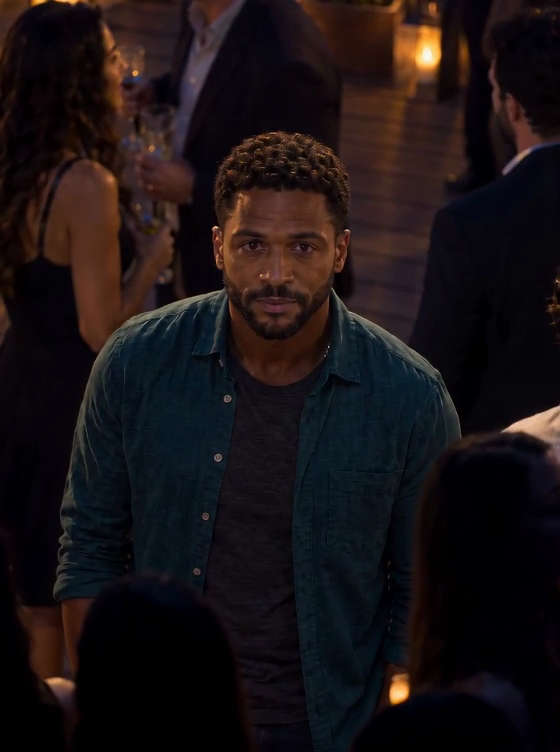
Two fictional adults exchange a look across a rooftop party in this 10-second AI video. City lights and a new instrumental score set the mood.
AI-generated video with fictional adult characters and instrumental music composed for this example. This prepared clip does not use your photos.
Character photos

How does the two-photo rooftop workflow work?
The planned workflow uses two adult photos, two cast previews, and your approval before video generation. Personalized generation is not available yet.
Choose the person on the upper terrace
Use a clear individual photo of yourself or an adult who has authorized this use. This is the first person, looking down toward the rooftop party.
Choose the person at the party
Use a separate authorized adult photo for the person looking up from the party below. Check the two roles and replace either photo if the order is wrong.
Review both previews before generating
When available, sign in, check the displayed credit cost, and prepare both cast previews. Approve the pair to request the video, or cancel before that step to return the reserved credits. Review a completed result before downloading.
What is available on Hotel Lobby AI today?
Hotel Lobby AI offers a completed AI video example of about 10 seconds, with fictional adults, an original rooftop setting, and instrumental music composed for the clip. You can watch the example and read the guide and posting captions in English or Spanish. Personalized generation from your own photos is not available yet.
What is the Three Meters Above the Sky trend?
It is an eye-contact remix format in which two people seem to find each other across a crowd. Related captions use “Tres Metros Sobre el Cielo” and “Te he perdido entre la gente,” meaning “I have lost you in the crowd.”
Our rooftop interpretation changes the cast and setting while keeping the feeling of finding someone across a crowd. The example has a new instrumental score instead of the original song. The site is not affiliated with the film or its performers.
Which person goes in each photo?
Photo 1 identifies the person looking down from the upper rooftop terrace, and Photo 2 identifies the person looking up from the party below. Use a separate image for each adult and check the role order before submitting.
Choose clear, well-lit photos of yourself or other adults who have authorized this use. Each image should show one unobstructed face. The photo backgrounds do not replace the fixed rooftop setting; there is no background selector.
What should I check before sharing an AI result?
Check both identities, expressions, and the direction of the shared look before approving or sharing an AI result. For any completed video, also review the camera movement, transitions, hands, facial details, and music.
The public video is a separately prepared example; the personalized two-photo workflow still needs full validation before launch. AI results may differ in framing, movement, and cut timing. Clearly label AI-created media when you share it.
What are the photo and video requirements?
The public example is a completed rooftop AI video. The requirements below describe the planned two-photo workflow, which is not yet available for personalized generation.
- Current availability
- Watch the completed example. Personalized video generation is not available yet.
- Example video
- Approximately 10 seconds, with fictional adult characters and an instrumental score composed for this clip.
- Photos
- Exactly 2 images: yourself or authorized adults, one person per image.
- Role order
- Photo 1: looking down from the upper terrace. Photo 2: looking up from the party below.
- Image formats
- JPG/JPEG, PNG, and WEBP.
- Maximum photo size
- 10 MiB per image.
- Requested duration
- 10 seconds for personalized video generation.
- Requested video settings
- 10-second request at nominal 480p, approximately 3:4 framing, with a fixed original instrumental soundtrack.
- Scene and music
- Fixed rooftop reinterpretation. Silent motion reference for the camera sequence; a fixed, approved original instrumental score is added to the finished video, without lyrics or the source song. No background or music selector.
- Camera and motion
- The prepared instructions request the reference shot sequence, camera movement, action, and cut timing. Exact matching is not guaranteed.
- Cast previews
- 2 previews, one per role. Approval of both is required before the video request.
- Written prompt
- Not required; the scene instructions are prepared.
- Account
- Sign-in is required for personalized generation.
- Cost and free allowance
- When enabled, the displayed credit cost includes both cast previews and the video. No free personalized-video allowance is promised.
- Processing time
- No guaranteed completion time; follow the job status.
- Download
- Planned output: MP4, with no extra credits charged for downloading a completed result.
- Other site template
- Hotel Lobby is a separate performance template. Check its generator for current settings and availability.
How does this compare with manual editing?
The rooftop template supplies a fixed scene and role instructions; manual editing gives you direct control over recorded footage and its timeline. Personalized rooftop generation is not yet available.
| Task | This rooftop template | Manual editing |
|---|---|---|
| Choose the cast | Two authorized adult photos, one per role. | Find or film authorized footage featuring the people you want. |
| Build the scene | An original rooftop party setting is prepared. | Select locations, clips, framing, and transitions. |
| Control the soundtrack | A fixed original instrumental soundtrack is included; no music selector. | Arrange audio tracks in an editor that supports them. |
| Review the result | Approve two cast images, then inspect any completed AI video. | Inspect the source footage, cuts, and added effects. |
What can I write when I post the video?
A short caption about the eye contact fits the scene. This version puts Spanish first, English second, and the four trend tags together.
Esa mirada no tenía por qué ser tan intensa 😭
This eye contact had no business being this intense 😭
What else should I know before generating?
You can watch the completed rooftop example now. Personalized generation is not yet available; these answers explain the example and the planned two-photo workflow.
Can I make this with two photos?
Not yet. The planned workflow uses two separate adult photos and two cast previews. Photo 1 is the person on the upper terrace; Photo 2 looks up from the party. The completed example was prepared separately and does not demonstrate a verified personalized generation.
Do I need to write a prompt?
No. The template provides the scene instructions. When generation is available, you choose the two photos, check their role order, and approve both cast previews before requesting the video. There is no prompt to write or paste.
Is this the “Meters Above Heaven” AI video?
If you mean the eye-contact format you searched for as “3 Meters Above the Sky,” this page shows our rooftop interpretation. “Meters Above Heaven” is used here as a search phrase, not as an official film title. The example has fictional adults and a new instrumental score.
Is it free to make my own version?
Watching the example is free and does not start a generation. When enabled, personalized generation will require sign-in and the displayed credits, including both cast previews and the video. No complimentary personalized-video allowance is promised.
Will the camera and faces match the previews exactly?
No. AI faces, expressions, camera framing, movement, and cut timing can vary. The instructions aim to follow a prepared camera sequence while changing the cast and rooftop setting. Review both cast previews and the completed video. The public example does not establish how your photos will turn out.
Does the example use the original song?
No. The example uses instrumental music newly composed for this clip, without lyrics or the source song. The planned personalized workflow reuses an approved original instrumental score and still needs validation before launch. There is no background or music selector.
What does “Te he perdido entre la gente” mean?
It means “I have lost you in the crowd.” The phrase describes the searching-and-finding feeling associated with the trend. Our rooftop interpretation keeps that emotional idea in a new setting, rather than presenting itself as a scene from the film.
Whose photos can I use?
Use photos of yourself or other adults who have authorized this AI use. Do not submit a photo if that permission is missing. The public example video uses fictional adult characters. Clearly identify AI-created images or videos when posting them.
Where can I check the rest of the workflow?
Use the account and credit information before starting; the Hotel Lobby links explain the site’s separate performance template.
Trend background: Europa FM.
Last updated: